

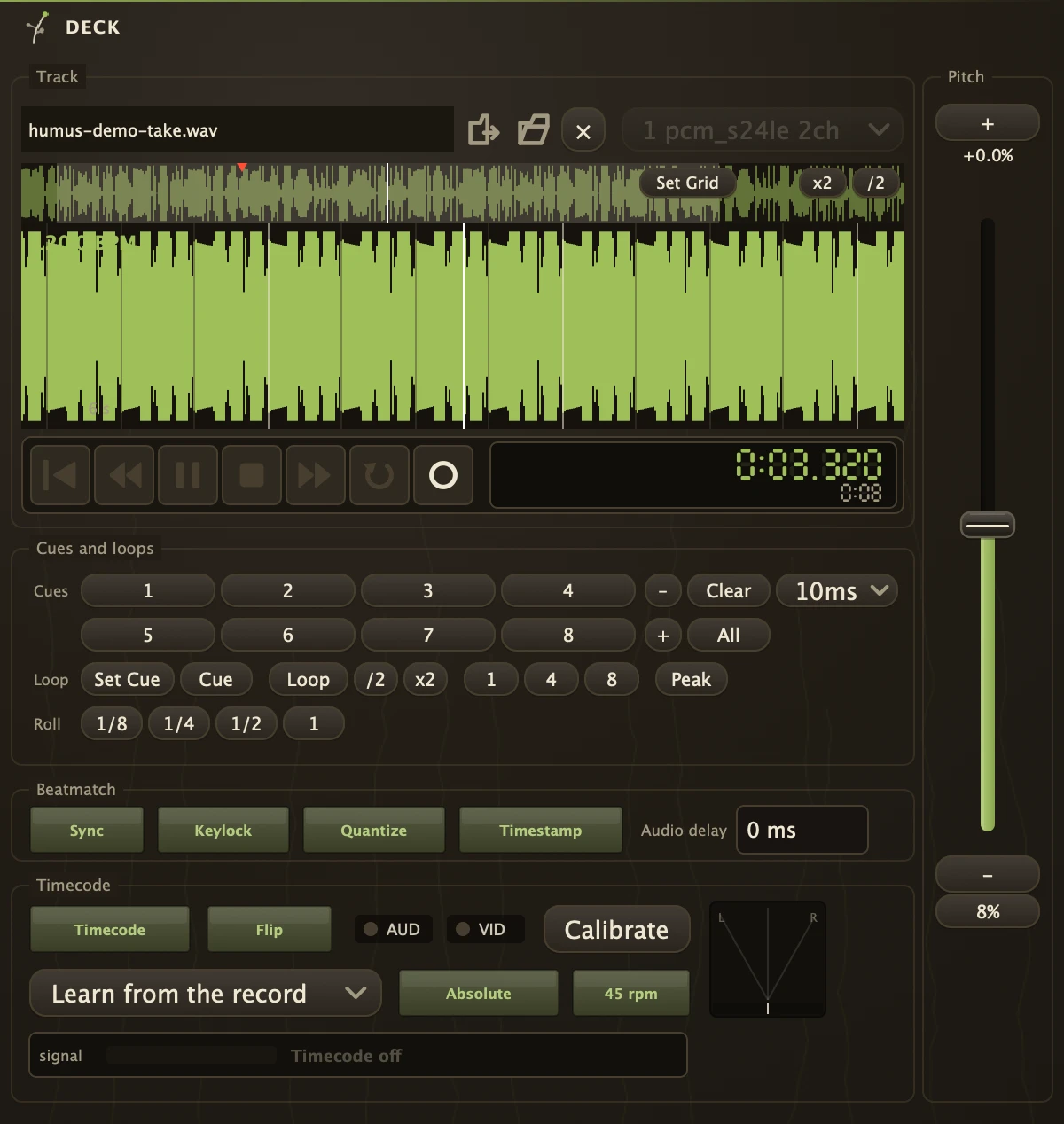
A DJ deck for sound files and videos: pitch fader, beatgrid, cues, loops, and timecode vinyl control.
| Inlets | |
|---|---|
| Audio | 2 |
| Video | 1 |
| Outlets | |
|---|---|
| Audio | 2 |
| Video | 1 |
| Timecode vinyl | Tested and supported with Traktor timecode vinyl MK2 and with Phase Essential. Switch Timecode on, cord the turntable through a Phono organism into the deck's inlets, and the record drives the platter: scratching, backspins, and lifting the needle stops it. The deck recognises the pressing and learns its tone as the needle lands. If the platter still runs fast or slow at normal speed, play the record at 33 (or 45) and press Calibrate: that tone becomes the deck's normal speed, saved with the patch, and the deck stops second-guessing it. Press Calibrate with the needle up to go back to learning it by itself. The record can run before the start of the track or past its end: the deck plays silence there and comes back in step when the record does. Pick the record in the list under Timecode (and 45 rpm if it plays at 45): normal speed then comes from the record itself, and Absolute makes the track follow where the needle is, so a needle drop lands in the track and scratching cannot drift. The first time a record is picked its table takes a few seconds to build, and the deck follows the record's speed meanwhile. If nothing tracks, look at the scope beside the switch: a clean ring is timecode, a diagonal line means both channels carry the same thing, a cloud means it is not timecode at all. |
| Beatmatching | Loading a track detects its BPM, grid and key. Flag two decks Sync and both ride the patch's tempo, in time with every sequencer and delay in the patch. |
| Videos | Load a video and the deck plays its sound and sends its picture from the video outlet; the picture follows the platter, scratching included. PictureSync trims the picture against the sound in milliseconds if your screen is late or early. |
| Peak | Press Peak and the deck loops the loudest part of the track for eight beats, starting on the beat before it when Quantize is on, so levels can be set on the biggest hit. Press again for the second loudest, and again for the third; all three are marked on the overview. The number beside the button is the loudest sample in the track, and turns red at full scale. A video's picture follows, so its loudest scene loops too. |
| Playhead anywhere | Right-click any knob in the patch and the deck's position, speed and seconds are under Control with. |
Parameters
| File | The sound file or video the deck plays. |
| AudioTrack | Which sound track of a video to play, when it has more than one. |
| Record | Arms the deck: what reaches its inlets while the patch records lands in the project's Recordings folder and back onto this platter. |
| FileSound | The sound played when it is not the one inside File, set by a recorded take. |
| Active | Play or stop, with a short fade so there is no click. |
| Loop | Loops between LoopIn and LoopOut. |
| Sync | Follows the patch's tempo and lines the beats up with the grid. |
| Keylock | Changes tempo without changing pitch. Bypassed while Timecode is on. |
| PictureSync | Shown as Audio delay: moves the picture against the sound, up to a second either way, per deck. Positive holds the sound back behind the picture; if the sound arrives after the picture, go negative. |
| Timestamp | Burns the deck's playhead time onto the picture it sends out. |
| Quantize | Snaps cues and loops to the nearest grid beat. |
| Timecode | Lets a control record drive the platter. |
| TimecodeHz | Kept so older patches open unchanged; the deck no longer reads it. TimecodeRest holds the calibration. |
| TimecodeFlip | Turn on if the track plays backwards when the record goes forwards. |
| TimecodeRest | The control tone at normal speed, set by Calibrate. 0 means the deck learns it by itself as the needle lands. |
| TimecodeCalibrate | Takes the tone arriving now as normal speed. With no tone arriving, goes back to learning it by itself. |
| TimecodeRecord | Which control record is on the platter. Learn from the record reads any record's speed; naming it gives the exact normal speed and lets Absolute find the needle. |
| Timecode45 | The record plays at 45 rather than 33. |
| TimecodeAbsolute | The track follows where the needle is on the record, less the record's lead-in. Between readings, while scratching and running backwards, it follows the record's speed. |
| BPM | The track's tempo. |
| PitchPercent | The pitch fader, in percent. |
| PitchRange | How far the fader travels, 8 to 50 percent. |
| Volume | Output level, not on the faceplate: set the level at the Mixer, or map this. |
| GridOffset | Where the grid's first downbeat sits, in samples. |
| LoopIn | Loop start, in samples. |
| LoopOut | Loop end, in samples. |
| LoopBeats | Beat-loop length, a quarter beat to 32 beats. |
| Peak | Loops the loudest part of the track; each press moves on to the next of the three loudest. |
| Cue | The main cue point, in samples. Cue jumps to it without starting or stopping the deck. |
| Key | The key detected when the track loaded. |
| HotCue_1 | The first hot cue, in samples; -1 means unset. Pressing an empty one stores the playhead, pressing a stored one plays from it, Shift-click clears it. And so on for 2 to 8. |
Recipe
| Two-deck mix | Load a track on each Deck and check the grid lands on the beats. Flag both Sync, cord them into a Mixer, and drop the second in on a hot cue at its first downbeat. |