

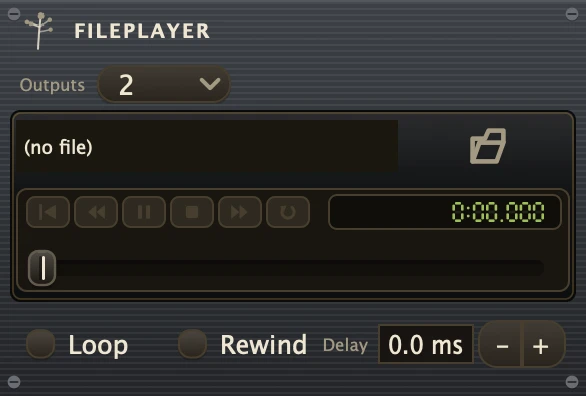
Plays sound files into the patch: one stereo file, or up to 32 at once, one per output.
| Outlets | |
|---|---|
| Audio | 2 |
Use it for backing tracks, field recordings and one-shot cues that do not need to follow the transport. It runs free: Active starts and stops it, and the position bar on the box scrubs to any point while it plays or sits paused. Every button on the transport strip is a parameter, so right-click any of them for MIDI Learn, OSC Learn, Control with or Follow. The transport's Stop leaves it playing; press Stop a second time, when nothing is rolling, and it stops with everything else. Loop repeats the file with an optional gap of silence between passes, and AutoRewind decides whether each start picks up where it stopped or from the top. For loops that stay locked to the beat, use LoopPlayer instead. Cord the output into a Mixer or straight to SoundOut.
Outputs, at the top of the box, turns it into a multi-file player with 4, 6, 8, 16, 24 or 32 outputs and one file row per output. A file in row 1 plays from output 1 on, one output per channel: a mono file takes one output, a stereo file in row 1 takes outputs 1 and 2, and a six-channel file takes six, while the rows it covers stay silent. All the files start, stop, loop and scrub as one, the longest sets the length, and shorter ones go quiet at their end until the next pass. Changing Outputs keeps the files and every cord that still fits; at 2 it is the stereo player again.
Parameters
| File | The sound file to play. Choose it with the file button or drop a file onto the slot. |
| File_1-File_32 | The file in each row of a multi-file player, shown when Outputs is more than 2. |
| Loop | Plays the file again from the start each time it reaches the end. Off plays it once and then goes silent. |
| LoopDelay | Seconds of silence inserted between the end of one pass and the start of the next. Only used while Loop is on. |
| AutoRewind | Jumps back to the beginning each time Active turns on. Off resumes from wherever playback last stopped. |
| Active | Starts and stops playback. Automate it to bring a file in at a set point in the patch. |
Recipe
| Cued backing track | Load the file, AutoRewind on, Loop off. Cord the output into a Gain, then to SoundOut, and map Active to a Button so one press starts the track from the top every time; a second press stops it and the next press starts it clean again. |