

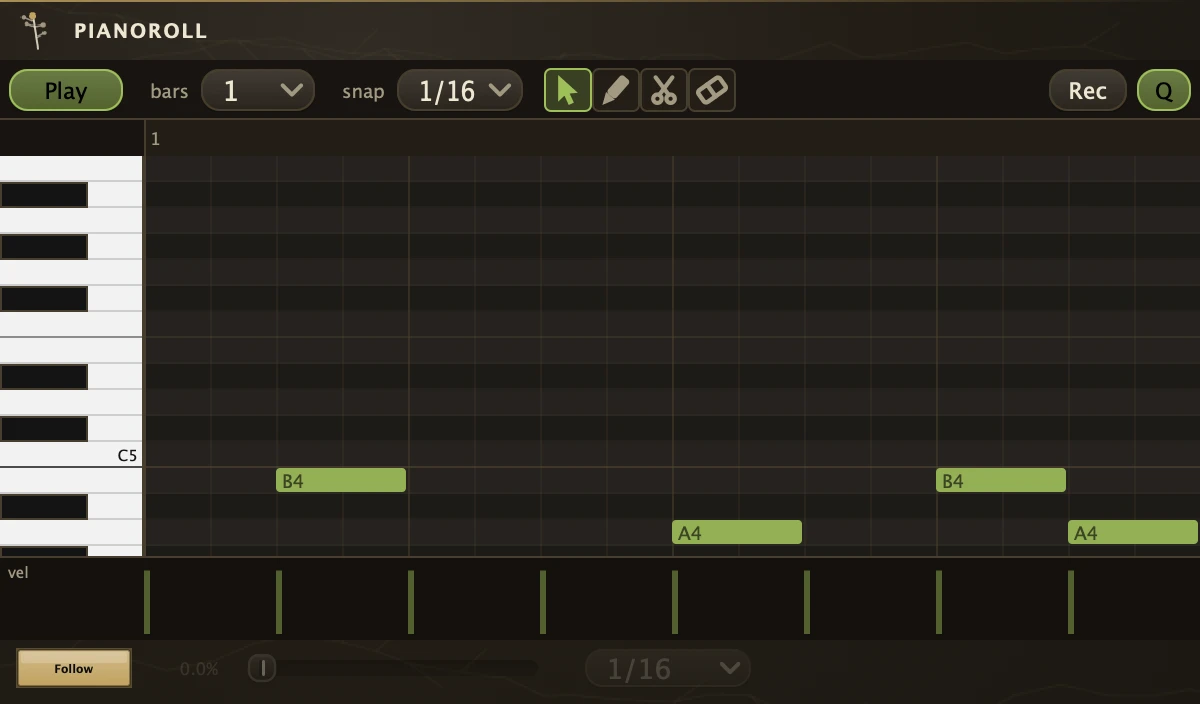
A looping note source that plays its clips through its MIDI cords wherever the transport is.
| Outlets | |
|---|---|
| MIDI | 1 |
Cord its outlet into any instrument, a Rhizome, a Sampler or a MidiOut for hardware, and press play; cord it into three at once and one riff drives all three. It is a loop you patch rather than a part you arrange: the song's instruments carry their clips on the Timeline, while a PianoRoll carries its own inside the patch. An empty roll still follows the clock, so a faint line sweeps the grid and wraps at the last bar before there is a note to play. Recording captures what you play whatever the organism's MIDI receive mode says, and a whole take is one undo step.
The roll
Pointer selects and moves, Draw creates, Scissors splits, Eraser sweeps away, on keys 1 to 4. Drag a note's tail to resize it and Alt-drag vertically for velocity; right-click a note or the selection to give it a colour, quantise it to a grid, print the groove into it or delete it, and the arrow keys move the selection by a semitone or a grid step. The strip under the grid is the velocity lane; right-click it to switch to a controller or pitch bend lane and draw the curve there. In a controller lane, click a point to select it, Shift-click to add another and Ctrl or Cmd-drag to box several, then right-click to colour or delete them. The Loop button is a one-tap looper: tap on an empty clip to record, tap again to close the loop at a whole bar, then each tap toggles Dub and Play. Rec records what you play on any MIDI input straight into the roll and Q quantises it to the snap grid. Neither waits for the transport's Record, and both keep going with the editor closed.
Parameters
| Bars | The clip length in bars. |
| Channel | The MIDI channel the notes leave on. |
| Mute | Silences the output without disconnecting anything. Held notes are released when it goes on. |
| VelocityScale | Multiplies every note's velocity on the way out. At 1 they play as drawn. |
| SwingFollow | Follow makes the roll take the patch groove from the transport instead of its own Swing and SwingUnit. |
| Swing | Delays every second unit, up to a triplet feel. Used only while Follow is off. |
| SwingUnit | The note value Swing works on, 1/8 or 1/16. |
| Record | Records live MIDI into the roll while on, starting the transport if it is stopped. It is never saved on. Right-click Rec to map it. |
| Loop | One press is one looper tap: record, close the loop, overdub, play. Right-click Loop to clear the roll or map it. |
| Quantize | Snaps recorded notes to the roll's snap grid. Right-click Q to map it. |
Recipe
| One riff, three voices | Bars 2, draw a two-bar bass figure, and cord the outlet into a Rhizome, a Sampler and a MidiOut at once. VelocityScale 0.8, Follow on so the figure takes the patch groove, and map Mute to a Button to drop the line for a break. |